
Home
› Memory module SPD comparison and programming scheme
Memory module SPD comparison and programming scheme
Utilizing the WizProDDRX series programmer, perform the following operations on EEPROM/SPD chips related to DDR3/DDR4/DDR5 memory:
· SPD / Data file loading and buffer editing
Download data to the programmer for offline programming
· Chip programming, verification, and readback
· Automatic scanning and programming (barcode write buffering, error prevention, order range verification)
· Online SN increment and comparison masking
· Production information (work order, material, checker) and result log
· MES transit and result feedback (this function is non-standard and requires custom software development based on user requirements)
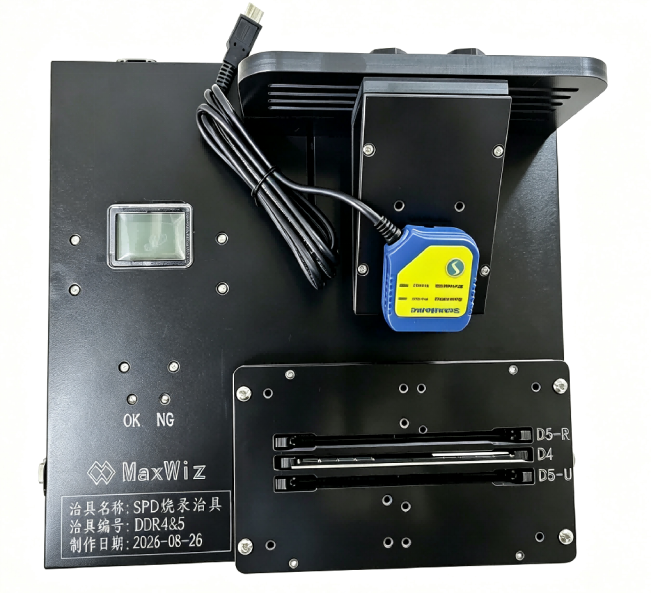
Standard Operating Procedure
Applicable to: scanning and programming SN and other data of chips.
1. Connect devices
Power on the programmer, fixture, and scanner; start the software (if login is required, log in first).
2. Connection port
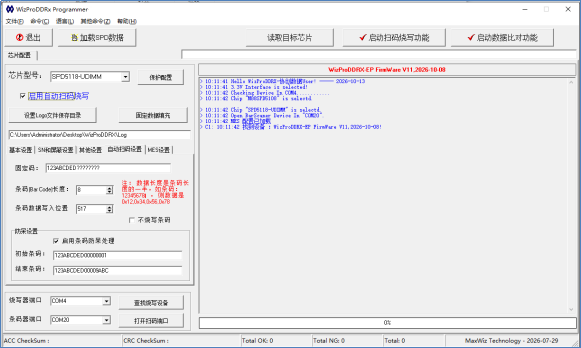
"Search for programming device" → select scan COM → "Open scanning port".
3. Select the chip and load the data
Select the correct chip model from the dropdown list → "Load SPD Data" (or rely on automatic loading of .bin).
4. Configure basic parameters
VOUT / VPP, automatic detection of stabilization time, whether to fill in date and offset.
5. Configure SN / Masking
Set up according to engineering specifications; add comparison and shielding in the dynamic area.
6. Fill in other information
Work order, material, checker, lot, etc.
7. Configure scanning rules
Fixed code, length, write offset, fool-proof start and end codes; confirm whether to "not burn the barcode".
8. Configure MES (if available)
Load and enable MES, then save.
9. Enter mass production
Check "Enable automatic scanning and programming" → Click "Start scanning and programming function" → A programming/scanning dialog box pops up.
10. Operation rhythm
· Insert the chip (if automatic detection is enabled, wait for it to stabilize)
· Scan barcode: scan the complete barcode
· Software verification: length/fixed code/fool-proof range → (whether it is repeated on the same day) → (MES: CheckRoute transit)
· Write to the buffer after passing and perform burn-in verification
· Success: progress is blue, OK count +1; failure: red, NG +1, handle according to prompts
· When MES is enabled: End and send back OK/NG to the next station
11. Switch to a new slide and repeat; click "Exit" at the end of the workday to automatically save DDRCfgX.INI and session logs.